4.1 The requisition register
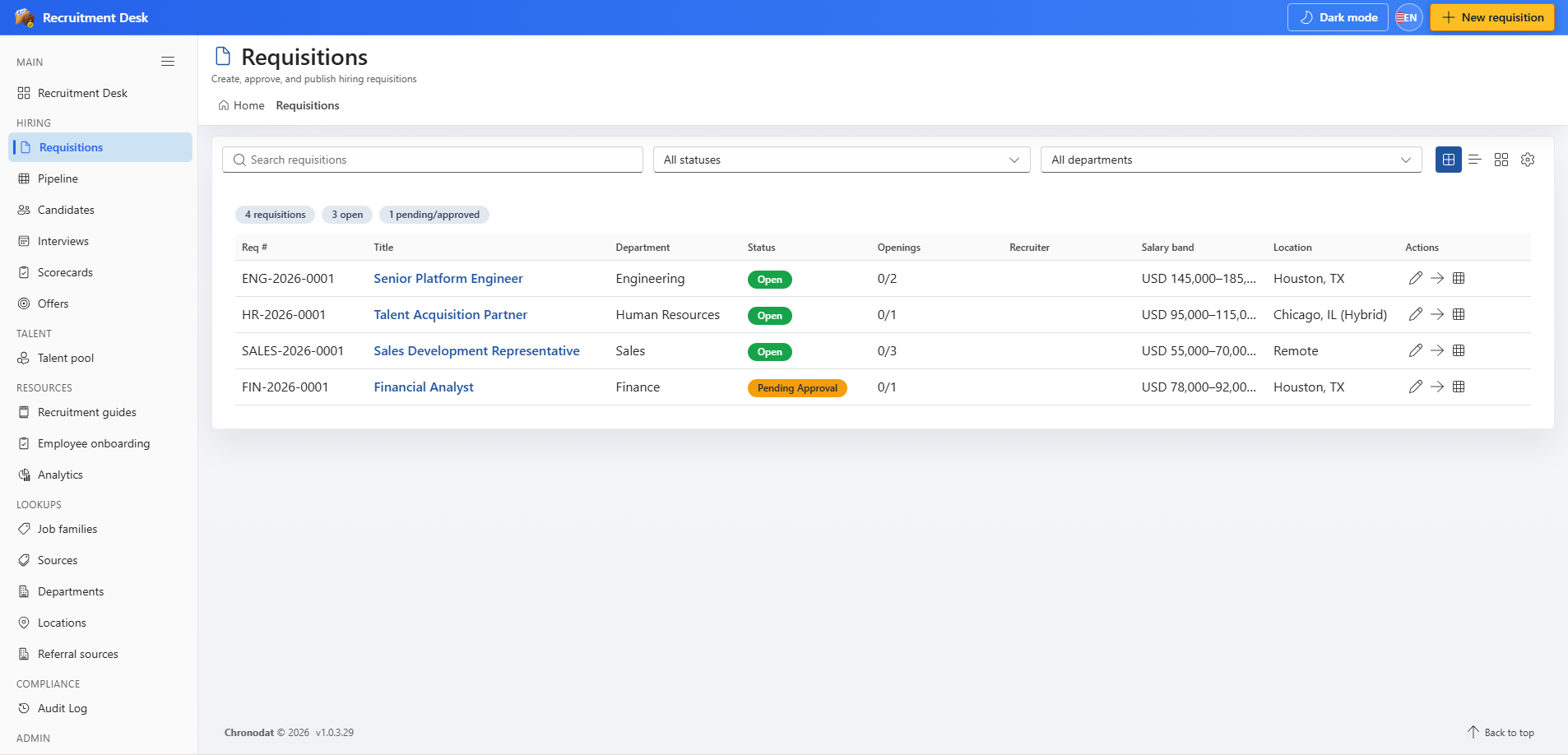
The register lists every requisition with search, a status filter, and a department filter.
| Column | Description |
|---|---|
| Req # | Auto-generated requisition number |
| Title | Job title being recruited |
| Department | Owning department from the lookup list |
| Status | Current position in the requisition lifecycle |
| Openings | Filled count against total openings |
| Recruiter | Recruiter accountable for the role |
| Salary band | Approved compensation range |
| Location | Primary work location |
4.2 Requisition statuses
| Status | Meaning |
|---|---|
| Draft | Being prepared, not yet submitted |
| PendingApproval | Submitted and waiting for an approver |
| Approved | Approved but not yet opened to candidates |
| Open | Actively accepting and progressing candidates |
| OnHold | Paused, usually for budget or headcount reasons |
| Filled | All openings have been filled |
| Cancelled | Withdrawn and no longer being recruited |
Requisitions can only be deleted while they are in Draft or Cancelled, and only by someone whose role grants the delete permission. This keeps live hiring history intact.
4.3 Create a requisition
- Choose New requisition from the header, or Create in the register.
- Enter the job title, department, job family, and hiring manager.
- Set the number of openings, employment type, work mode, and priority.
- Record the salary band, target start date, and stage SLA in days.
- Mark the role Confidential or Internal only if it should be restricted.
- Save as Draft, or submit for approval if the approval workflow is enabled.
Which fields appear on the form is controlled by Settings → Forms, and administrators can publish job-family specific layouts from Settings → Form Templates.
4.4 The requisition record
Opening a requisition shows four tabs.
- Overview — department, locations, employment type, work mode, priority, openings progress, salary band, SLA days, target start date, and the confidential and internal flags.
- Team — the recruiter, hiring manager, and interview panel members attached to the role.
- Postings — the job board channels the role has been published to, each with a Draft, Published, or Closed state.
- Activity — the audit trail of every change made to this requisition.
From the record you can open the pipeline board, add an application, edit the requisition, or delete it when your role and its status allow.
4.5 Approval routing
When approval routing is switched on in Settings → Recruitment Compliance, an approval panel appears on the requisition record. Administrators choose which roles can approve; by default that is Organization Admin and Hiring Manager. You can also require approval before a requisition is allowed to reach the Open status.