2.1 Layout Areas
| Area | Description |
|---|---|
| Left sidebar | Primary navigation grouped into Main, Operations, Workforce, Financial, and Admin |
| Header | App title, dark mode toggle, language selector, and New Work Order action |
| Main content | Page-specific lists, forms, charts, kanban boards, and actions |
| Footer | Version and copyright line |
2.2 Navigation Groups
- Main — Dashboard.
- Operations — Work Orders, Scheduler, Customers, Sites, Assets, Inventory.
- Workforce — Technicians, Skills, Vehicles.
- Financial — Contracts, Estimates, Invoices.
- Admin — Reports, Audit Log, Settings (site owners and app administrators).
Collapse the sidebar on desktop to maximize table and chart space. Toggle dark mode for low-light dispatch desks. Use the language menu to switch between English, Spanish, French, and German.
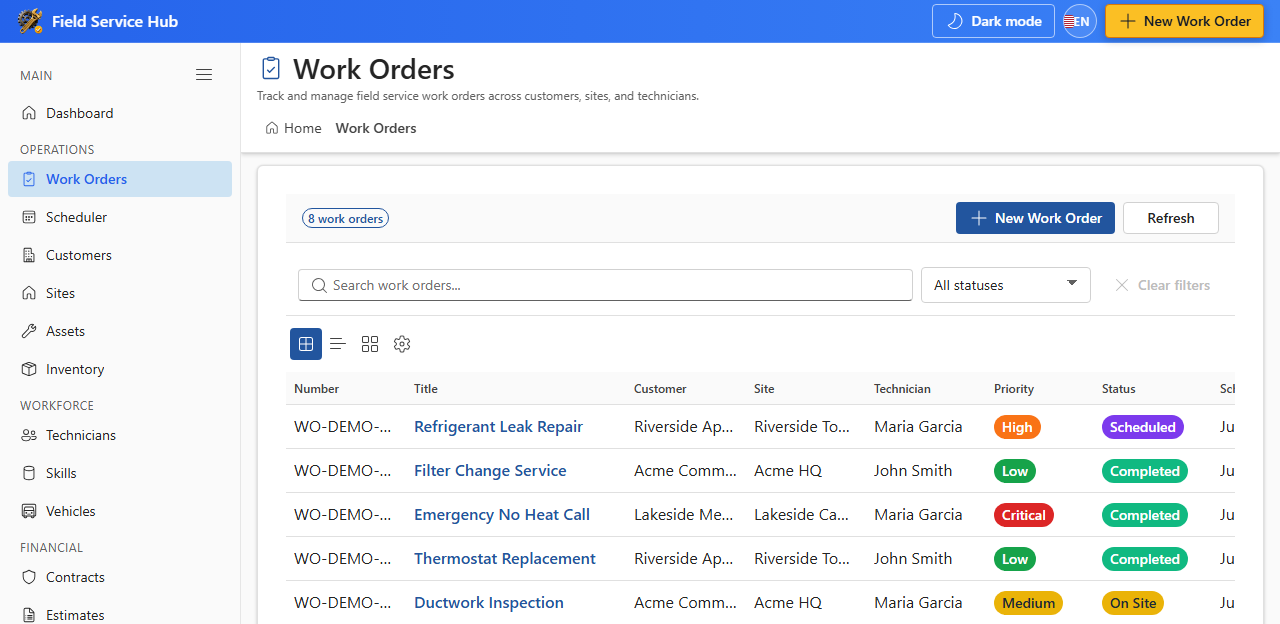
Administrators see Settings and Audit Log in the Admin group. Technicians may see a reduced navigation set depending on SharePoint list permissions.
