SharePoint SPFx: What It Actually Does for Your Organization
Most people in your organization use SPFx every day without knowing the name — the web parts on modern SharePoint pages, the custom forms that replace clunky list dialogs, and the apps pinned as Teams tabs. Here is what it actually delivers for the people who live in Microsoft 365, and why IT and site owners should care.
Key takeaways
- Custom dashboards load directly on SharePoint pages — no separate portal.
- One SPFx solution runs across SharePoint, Teams, Viva Connections, and Outlook.
- Data lives in SharePoint lists inside your tenant — no external database.
- Graph and Entra ID–secured calls, validated forms, and a native page experience.
What you see vs. what built it
When someone opens a SharePoint page and sees a time-entry grid, an asset register, or a risk dashboard that feels like a real application — not a spreadsheet pasted into a page — that experience was almost certainly built with the SharePoint Framework, usually shortened to SPFx.
SPFx is Microsoft's model for building custom components that run inside SharePoint Online and Microsoft Teams. Developers care about TypeScript, toolchains, and package deployment. Users care about something simpler: does this page help me do my job faster, with fewer clicks, and without leaving the tools I already use?
That is the lens this article uses. SPFx is not a developer novelty. It is the reason SharePoint stopped being "a place to store files" and became a surface where organizations run governed business processes.
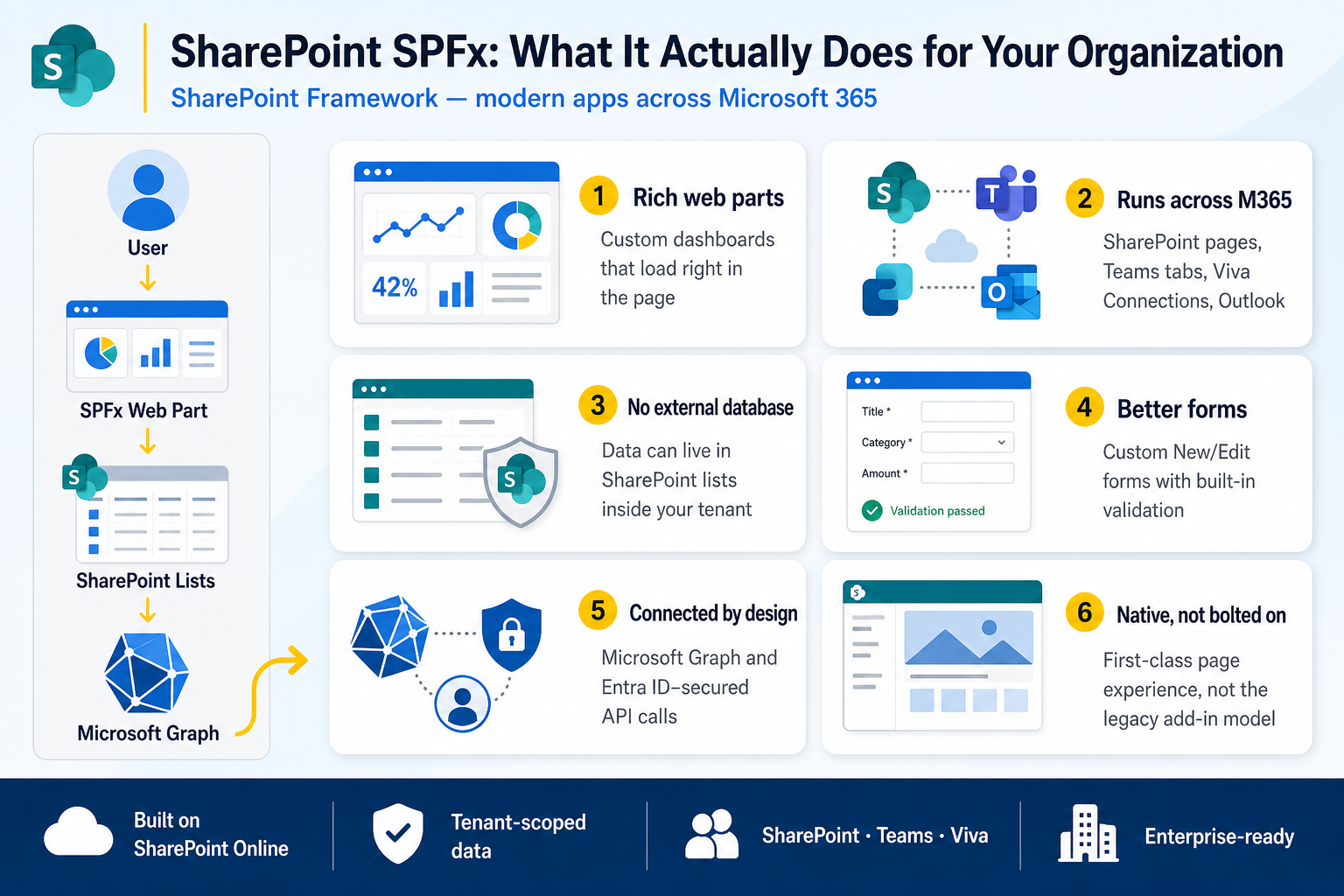
Six ways SPFx helps your organization
Rich web parts
Custom dashboards that load right in the page — not in a separate portal or bookmarked URL. Out-of-the-box SharePoint lists are fine for storing rows; they struggle when a team needs filters, role-based views, inline actions, charts, and guided workflows on one screen. SPFx web parts add that composed experience on top of the lists underneath.
A project manager sees only their projects. A billing lead sees invoice status. An employee sees a time-entry grid pre-filled for the current week. Same page template, different lens — because the web part reads permissions and context from SharePoint.
Runs across M365
SharePoint pages, Teams tabs, Viva Connections, and Outlook — one SPFx package can surface in each without rebuilding the product four times. Most organizations split attention between sites and channels; SPFx meets people where they already work.
For users, that means fewer "where do I go for this?" moments. The help desk queue, the compliance register, and the asset lookup live inside the tools they open every morning — not on a bookmark nobody remembers.
No external database
Data can live in SharePoint lists inside your tenant — tickets, assets, timesheets, risks — governed by your permissions model, not copied to a shadow database elsewhere. SPFx apps read and write those lists and call Microsoft Graph when they need identity or cross-service actions.
Search works. Version history applies. Retention policies apply. When someone leaves the company, access revokes cleanly because the data never left your Microsoft 365 boundary.
Better forms
Custom New and Edit forms with built-in validation replace the default list dialogs when a process needs conditional sections, lookups across lists, or a layout that mirrors how people actually think about the record.
SPFx form customizers save to the same list item — users get a purpose-built panel; administrators keep a single source of truth.
Connected by design
Microsoft Graph and Entra ID–secured API calls are native to the SPFx runtime — people profiles, Teams membership, Planner tasks, Power Automate flows, and Power BI embeds, all under the signed-in user's identity.
Practical outcomes: "@mention the approver" resolves to a person. A status change triggers a flow. A dashboard shows org-chart context without exporting CSV files every Monday.
Native, not bolted on
A first-class page experience — not the legacy add-in model, not an iframe pasted into a web part zone. Before SPFx matured, teams embedded external sites that broke on mobile, fought authentication, and felt foreign inside SharePoint.
SPFx components inherit SharePoint theming, respond to page sections, and behave like parts of the modern page. Users notice the difference as "this just works" even if they cannot name why.
How it fits together
The flow in the infographic above is the pattern every SPFx solution follows. A user opens a SharePoint page, Teams tab, or Viva card. An SPFx web part loads in the browser. It reads and writes list data on the current site (or connected sites the user can access). When needed, it calls Microsoft Graph for identity, search, or cross-service actions.
No separate login. No "open this other portal." The app meets the user inside Microsoft 365 — User → SPFx web part → SharePoint lists → Microsoft Graph.
SPFx vs. the alternatives users feel
| Approach | What users experience |
|---|---|
| Plain SharePoint lists + views | Fast to stand up, but limited UI, weak guidance, and brittle when the process grows |
| Power Apps on SharePoint lists | Strong forms and mobile; best when a canvas or model-driven app is the whole product |
| Embedded external site (iframe) | Authentication friction, inconsistent layout, often breaks on mobile |
| SPFx web parts & extensions | Native SharePoint/Teams/Viva UX, list-backed data in your tenant, Graph-connected — no external database |
None of these is universally "best." SPFx earns its place when the experience must live on SharePoint pages, respect site permissions, and still feel like a product — not a workaround.
Where users already encounter SPFx
If your organization uses third-party SharePoint apps from the marketplace or a partner, many are SPFx packages deployed through the tenant app catalog. The install step is invisible to end users; what they see is a new web part in the toolbox when editing a page.
Common patterns:
- Department hubs — dashboards combining lists, charts, and quick actions on one landing page
- Operational apps — time tracking, asset management, help desk, compliance registers
- Form upgrades — multi-step New/Edit panels on critical lists
- Teams tabs & Viva cards — the same hub in a channel or on the Viva Connections dashboard
Products like Timesheets Lite, Time & Billing Hub, Asset Management Hub, and Risk & Compliance Hub are SharePoint Framework applications — web parts, form customizers, and Teams packages backed by site-scoped lists. The user outcome is the same pattern described here: one governed app inside Microsoft 365, not a parallel system to maintain.
What to ask before adopting an SPFx solution
Site owners and champions do not need to read package manifests. A short checklist prevents surprises after rollout:
- Where does data live? Confirm list names, site scope, and whether any data leaves the tenant.
- Who can install it? Tenant catalog deployment typically needs an admin; site-scoped apps may need a site collection admin.
- SharePoint only, or Teams too? If the team lives in Teams, verify tab and personal app support before training everyone on a SharePoint URL.
- Permissions model — does the app honor SharePoint groups and item-level access, or does it introduce its own role layer?
- Mobile and guest access — test on a phone and with a guest account if external collaboration matters.
If a process still sends people to three different lists, an Excel export, and an email thread, SPFx is probably worth evaluating. If a single list view already covers the job, do not add complexity for its own sake.
Getting value without becoming a developer
End users get value the day a well-designed web part replaces a fragile workaround. Site owners get value when provisioning, permissions, and training are simpler because everything stays in SharePoint. IT gets value when security review focuses on one tenant-scoped package instead of another external SaaS login.
SPFx is the plumbing. The outcome is measured in minutes saved per timesheet, audit trails that exist without a separate log, and teams that stop asking "which link was the real one?"
To go deeper on deployment mechanics, see our guide on adding apps to a SharePoint Online site. For Microsoft's platform overview, start with the SharePoint Framework documentation.
Discussion
Comments